

How Chevy Safety Assist in the 2026 Chevrolet Trax Builds Confident Driving for Swampscott, MA
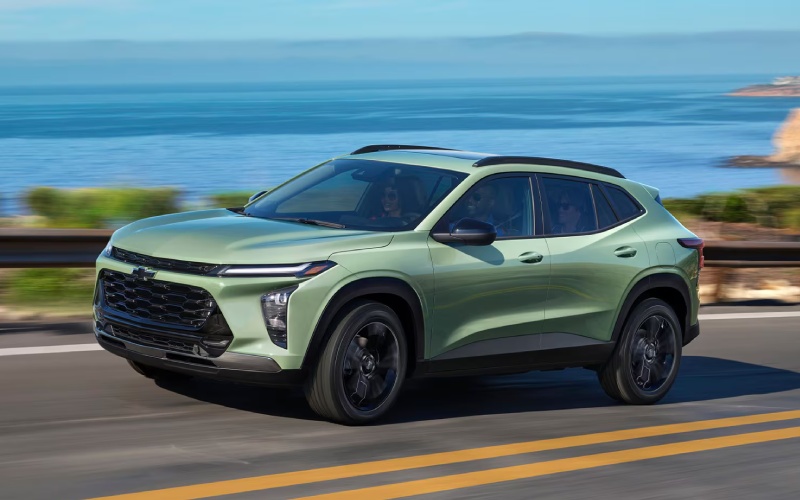
Pride Chevrolet – How Chevy Safety Assist in the 2026 Chevrolet Trax Builds Confident Driving for Swampscott, MA
Chevy Safety Assist is standard on every 2026 Chevrolet Trax, and if you regularly navigate the neighborhood streets, beach traffic, and rotary merges that define Swampscott, MA, it can feel like having an extra partner on every drive. The suite includes Forward Collision Alert with Automatic Emergency Braking, Front Pedestrian Braking, Lane Keep Assist with Lane Departure Warning, Following Distance Indicator, and IntelliBeam® High Beam Assist—features built to help you see, react, and maintain control when the unexpected pops up. Paired with the Trax’s compact footprint and excellent sightlines, the result is confidence that shows up in the moments that matter, from a sudden crosswalk stop to a quick lane nudge that puts you right back in the center.
What stands out is how naturally these systems integrate into your day. Forward Collision Alert scans ahead and warns you if you’re closing too quickly on a vehicle, while Automatic Emergency Braking can help reduce the severity of a potential impact under certain conditions. In denser parts of town near schools or village centers, Front Pedestrian Braking adds a watchful eye when foot traffic gets heavy. Lane Keep Assist with Lane Departure Warning is there on those times you glance down to adjust audio or check a turn; the gentle steering support helps keep you from drifting, and the alert is a quick cue to refocus. And when dusk hits, IntelliBeam® High Beam Assist automatically toggles the high beams to avoid dazzling oncoming drivers, then brings them back when the road opens up.
Everyday Ease With Smart, Subtle Support
One reason Chevy Safety Assist works so well in the 2026 Chevrolet Trax is the tuning. The alerts feel purposeful rather than intrusive, and the steering nudges from Lane Keep Assist are designed to be supportive, not startling. This matters when you’re managing a full day—groceries, practices, quick detours through narrow side streets—where a vehicle that stays calm helps you stay calm. The compact size of the Trax complements that balance: it’s easy to place in a lane, simple to thread through tight parking, and confident in quick maneuvers when traffic compresses and expands.
Just as important, the technology is anchored by a driver-focused cabin. The available 11-inch center HD touch-screen is positioned to minimize distraction, and wireless Apple CarPlay® and wireless Android Auto™ compatibility streamline navigation and media so you spend less time tapping and more time moving. When the drive demands your attention, these small efficiencies add up to bigger focus on the road.
Confidence Beyond the Commute
Chevy Safety Assist isn’t only about rush hour. If your weekends take you along the coast, into neighborhood arts events, or through busy shopping areas, the system’s blend of alerts and gentle intervention supports smooth, predictable driving. Following Distance Indicator helps you keep more consistent spacing in rolling traffic, and those automatic high beams take one more task off your hands on darker local roads. The Trax’s standard LED headlights further sharpen nighttime visibility, and the calm, quiet cabin with Active Noise Cancellation lets conversations and podcasts come through clearly without raising voices.
If you’re comparing trims, know that every Trax includes Chevy Safety Assist. From there, you can tailor other features—like an available 11-inch center HD touch-screen, wireless charging, and a built-in Wi-Fi® hotspot—to match your routine. Drivers who love expressive design might lean into RS models with bold Black exterior details and a flat-bottom steering wheel, while those drawn to an outdoorsy vibe can choose ACTIV for Titanium chrome accents, blackout wheels, and unique interior touches. No matter which look you prefer, the core safety support remains consistent.
How It Feels From the Driver’s Seat
What drivers often report is that the 2026 Chevrolet Trax feels intuitive. The steering is light but precise, the seating position offers a clear view of cross-streets and corners, and the safety cues help you react earlier. In a town where stop-and-go is normal and parking can be tight, those characteristics reduce fatigue. Every element seems to prioritize the real-world rhythm of errands, work commutes, and short hops to friends or family. It’s not about driving for the sake of it; it’s about feeling supported while you get life done.
Over time, that support changes how you approach the road. You begin to anticipate smoother stops because the Forward Collision Alert keeps you keyed into the flow of traffic. You notice you’re glancing less at your high-beam stalk at dusk, and that you’re staying more neatly centered through gentle curves with Lane Keep Assist working in the background. It’s a subtle shift, but it’s how good tech makes you a more consistent driver, not just a safer one.
Getting the Most From Chevy Safety Assist
As with any driver-assistance system, the best results happen when you remain attentive and familiar with how each feature behaves. Spend a few minutes in the settings to customize alerts to your comfort level. Review the Owner’s Manual for feature operation and limitations. Then, practice in a low-stress environment—your neighborhood loop or a quiet stretch near the water—so the feedback and cues become second nature. Once the tech feels familiar, you’ll appreciate how seamlessly it blends into busier drives.
If you’re new to advanced driver-assistance systems or this is your first modern small SUV, a quick walk-through with a product specialist can make a big difference. Learning how warnings appear, how steering support feels, and what triggers automatic braking will help you build trust in the system. Many shoppers find that seeing the features demonstrated on familiar streets boosts confidence right away.
Why Local Drivers Appreciate the Trax
Swampscott driving rewards vehicles that balance visibility, maneuverability, and smart tech. The Trax’s footprint makes parallel parking and tight-lane placement easier, while the safety suite helps you handle surprise slowdowns and busy pedestrian zones with steady composure. Add in useful conveniences like available wireless charging and a built-in Wi-Fi® hotspot, and you’ve got a small SUV that’s ready for every turn in your day.
When you’re ready to take a closer look, Pride Chevrolet is happy to walk you through Chevy Safety Assist in real time and help you configure the rest of the Trax to your needs. Our team is proud to be serving Marblehead, Swampscott, and Everett, and we’ll help you explore trims, features, and ownership paths that fit your routine without pressure.
FAQ: Chevy Safety Assist in the 2026 Chevrolet Trax
Are all Chevy Safety Assist features standard on every Trax?
Yes. The core suite—Forward Collision Alert, Automatic Emergency Braking, Front Pedestrian Braking, Lane Keep Assist with Lane Departure Warning, Following Distance Indicator, and IntelliBeam®—is standard across the lineup.
Does Chevy Safety Assist replace driver attention?
No. These features support an attentive driver and have operational limits. You remain responsible for safe vehicle operation at all times.
Can I adjust how alerts appear or sound?
Yes. You can personalize alert settings in the vehicle menus. Ask a product specialist to show you where and how to tailor them to your preference.
Which Trax trims are best if I want more tech?
All trims include Chevy Safety Assist. If you want more infotainment capability, look for models with the available 11-inch center HD touch-screen, wireless charging, and a built-in Wi-Fi® hotspot.
Will the Trax help with night driving?
Yes. Standard LED headlights and IntelliBeam® High Beam Assist help improve nighttime visibility by automatically managing high beams when appropriate.

0 comment(s) so far on How Chevy Safety Assist in the 2026 Chevrolet Trax Builds Confident Driving for Swampscott, MA